Simple tools to record your health clearly
Choose a feature to see the real screen. All screenshots use fictional demonstration data.
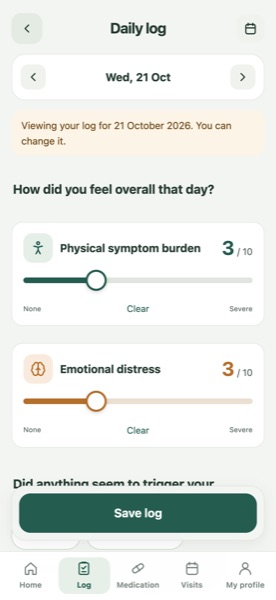
Daily log
Rate physical symptom burden and emotional distress from 0 to 10, each on its own. Then add symptoms, foods you noticed, medication and side effects.
- Capture how the day really felt while it is still fresh.
- A blank score stays blank. It is never counted as zero.
Symptoms and foods
Choose from common gut and other symptoms, or add your own, and rate each one. Note foods or lifestyle factors you noticed on the same day.
- Bring specifics, not just "it's been bad lately".
- Foods you tick are your own observations, not proof of a cause.
Medication tracking
Mark regular medicines as taken, missed or not needed. Log as-needed (PRN) doses with a time. Record dose changes with the date they happened.
- Know what you took, and when things changed.
- Healing365 does not give medication advice. Past days keep the dose recorded at the time.
Trends and calendar
See physical and emotional scores over 7, 14 or 30 days. A calendar shows logged days in green and missing days in orange. Pinch to zoom out to 90 days.
- Spot how things have changed between appointments.
- Charts show your entries only. They do not explain why things changed.
Notes for your doctor
Write down a question the moment you think of it. Notes go straight into "I want to discuss" on your consultation summary.
- Fewer forgotten questions at the appointment.
- Notes are printed exactly as you wrote them.
Consultation summary PDF
Choose a date range and the sections to include, then make a summary in Traditional Chinese or English to print, save or share.
- Give your doctor a clear, organised overview.
- The summary is clearly marked as patient-reported. It is not a medical record or a diagnosis.
After-visit notes
After an appointment, note what was discussed, advice, tests or referrals and medication changes, and add questions for next time.
- Keep a record of each visit to look back on.
- These are your own notes. They are not verified by your doctor.
Your records stay on your device
No account and no server. Only files you choose to share leave the app. Read the Privacy Policy
What Healing365 does not do
- It does not diagnose or recommend treatment or medication.
- It does not judge whether a treatment works or guess what caused a symptom.
- It does not monitor your records or contact anyone for you.
- It does not upload your records to the cloud or to our servers.
About artificial intelligence (AI)
Healing365 does not use AI to analyse your health records or to give medical recommendations. Summaries use fixed, simple calculations such as averages and day counts. AI-assisted tools were used while building the app and this website; they do not run inside the app and cannot access your records.
Common questions about features
Can I customise my symptoms?
Yes. Choose from the built-in gut and other symptoms, or add your own. Symptoms you add are remembered for next time, and you can stop using one without losing old records.
Can I track as-needed medication?
Yes. Mark a medicine as "as needed (PRN)" and log each dose with a time. Regular medicines are marked taken, missed or not needed each day.
Can I export my records?
Yes. Export a full backup file from Settings, and make a consultation summary PDF from Visits. Both are saved only where you choose. They are not encrypted, so keep them safe.
Does Healing365 replace medical advice?
No. Healing365 is intended for personal health recording and consultation preparation. It does not provide diagnosis, treatment advice, or emergency monitoring. Always talk to your doctor or pharmacist about your health and medicines.
Where are my records stored?
Only on your iPhone or iPad, inside the app. If you use iCloud or computer backups, those backups may include the app's data. See the Privacy Policy for details.